Release Summary 26.14 | July 09, 2026
The following key features and improvements, along with bug fixes, have been released in Digital Experience Personalization (DXP) in the release version 26.14.
Ensemble AI
Ensemble AI Virtual Try-On: Automated Image Generation for Styled Outfits
Ensemble AI now generates virtual try-on images automatically for the outfit combinations it curates, giving shoppers a visual preview of how a complete look comes together on a model. Generation is driven by style-level configuration: VTOs are created only when Virtual Try-On is enabled for a style, and only for the top-ranked outfits up to the configured limit per seed, so effort is focused on the outfits that matter most. The job uses the model image, gender, and category settings defined at the style level, using a client's own model image URL when provided and falling back to automatic determination for model, gender, and category otherwise.
The job also runs efficiently at scale, generating a virtual try-on only when an outfit's product combination is new and skipping outfits that have already been rendered. It runs as a separate process after ensembles are generated, so ensemble generation performance is unaffected, and it signals completion once images are ready so they can be included in the Ensemble AI API response.
This capability strengthens the shopping experience by helping customers visualize complete outfits rather than individual items, which can increase confidence in outfit-based purchases and drive higher engagement with styled recommendations. By combining automated generation with style-level targeting, teams reduce manual effort and unnecessary processing while keeping try-on content current as the catalog and outfit combinations evolve.
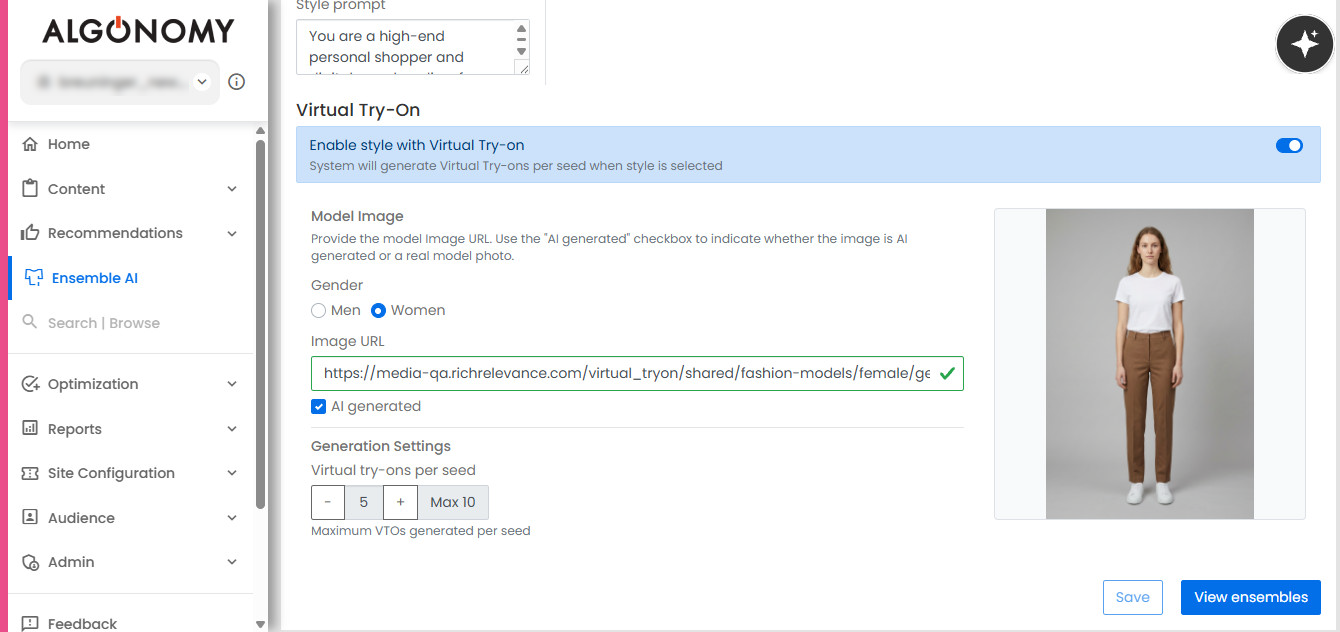
Ensemble AI: Style-Level Configuration for Virtual Try-On
Merchandisers can now configure Virtual Try-On settings directly at the style level within Ensemble AI, giving them control over which styles generate try-on images and how those images look. Once enabled through site configuration, users can turn on Virtual Try-On for individual styles and choose an AI-generated model image or upload their own, with validation to ensure the URL is valid, making it possible to align visuals with brand-specific models or campaign imagery. Style definitions also support reusable attribute configuration, allowing gender and category settings to be applied consistently across styles, with gender sourced from the catalog and category either set as primary or determined automatically when not specified.
Merchandisers also have control over volume through a configurable limit on the number of outfits per seed that receive a virtual try-on, defaulting to three, keeping generation focused on the outfits that matter most. Together, these controls reduce manual setup effort while keeping try-on generation accurate and consistent, allowing businesses to scale Virtual Try-On across a broader catalog with less ongoing configuration overhead.
Ensemble AI Virtual Try-On: Storage and Cleanup of Virtual Try-On Images
Virtual Try-On images generated for Ensemble AI are now stored in a dedicated directory within the CDN for each site, with the path to each image added to its corresponding ensemble so it can be served as part of the outfit. As part of the same process, the system identifies and removes images that no longer correspond to an active ensemble, keeping CDN storage aligned with the current catalog.
This automated cleanup keeps storage cost-efficient and ensures customers are never served outdated or irrelevant try-on images for styles that have changed or are no longer active, reducing manual maintenance for the team.
Jira: ENG-32339
Ensemble AI: Support for Forced MVT Treatment via r3_mvtTreatmentId
Merchandisers can now force a specific treatment for Ensemble AI multivariate tests, allowing them to preview a particular experience on demand. When a user passes r3_mvtTreatmentId as a parameter in the website URL, Ensemble AI now recognizes it and passes the corresponding mvt_ftr parameter through to its API, aligning its behavior with how p13n already handles forced treatments.
This gives merchandising and testing teams a reliable way to validate specific test variations directly from the website URL, making it easier to review and QA Ensemble AI experiences during A/B testing without waiting for natural test allocation.
Shopping Assistant
Chat Reporting: Shopping Assistant Transcripts Report
A new report, Shopping Assistant (Chat) Transcripts, gives merchandisers visibility into how customers engage with chat-based search and assistance. The report presents a session-level view of chat activity, including the date and timestamp, chat session, question asked, AI response, product clicks, drawing on chat transcripts and visit data to connect each question to the products it surfaced. The report also extends to full funnel-level engagement, tracking products included in each response along with cart additions and purchases within the session. Users can select a start and end date using the same defaults applied across other reports, and results are displayed in a table that can be exported to Excel for further analysis.
This report gives merchandising teams a clear picture of what customers are asking, how the AI is responding, and how those interactions translate into shopper actions through to cart additions and purchases. By connecting chat engagement to product discovery and downstream funnel behavior at the session and question level, teams can identify where chat is performing well and which responses are driving actual conversion, not just clicks.
Enhanced Voice Chat UI
The voice chat experience within the Shopping Assistant chatbot now features an updated visual design, making it easier for shoppers to initiate voice interactions and view results while in voice mode. The underlying voice support itself remains unchanged, with this update focused entirely on making the interface more intuitive and approachable to use.
A more accessible voice chat interface encourages greater adoption of the feature, helping eCommerce teams drive higher engagement with voice-based shopping assistance.
Jira: ENG-32370
Shopper Feedback on Chat Responses
Shoppers can now rate the helpfulness of chat responses directly within the chat interface using thumbs up and thumbs down controls, matching the design already used for chat feedback on the main dashboard. When a shopper submits feedback, the system captures the feedback type along with the specific question and answer involved, sending this data to the backend for downstream reporting and analysis.
This gives eCommerce teams a direct, ongoing signal of how well the chatbot is performing from the shopper's perspective. By capturing feedback at the individual question and answer level, teams gain the data needed to evaluate response quality and identify areas for improvement over time.
Jira: ENG-32741
Engage
Configurable Content Ordering
On the Content Catalog page, Engage content ordering has been updated so that content now displays in descending order by content ID by default, replacing the previous ascending order. Users can also choose between ascending and descending order based on their preference, rather than being limited to a fixed sequence.
This gives merchandisers greater control over how Engage content is presented to shoppers, allowing content order to be aligned with business priorities rather than a fixed default.
Jira: ENG-32734
Recommend
Enable Segment-Based Strategies for Non-Segment Shoppers
Configurable strategies that use a segment as a seed can now be enabled to play for shoppers outside that segment, allowing segment-based models to be used more broadly as a merchandising tool. For example, a recommendation model built from high-tier customer behavior can also be shown to mid-tier customers to surface premium products. By default, strategies still play only for shoppers within the segment, and only one segment can be used when this option is enabled. In the interface, this option appears as a checkbox under "Use Segment as a Seed"; selecting none or multiple segments triggers a warning and disables the save and preview buttons until corrected, and the selected segment name is shown in the Algorithm Assembly section instead of the segment picker.
This gives merchandisers a clear, guided way to extend well-performing segment models to a wider audience without rebuilding strategies, with validation built in to prevent misconfiguration.
User Affinity Configuration: Expanded Attribute Combinations and Reuse
User Affinity Configuration now supports combining up to four attributes in a single row, increased from the previous limit of two, allowing more nuanced affinity signals across multiple product dimensions. Once a row reaches four attributes, it no longer accepts further additions. Attributes already used elsewhere in the configuration, whether fixed or within a combined row, can now be reused and will appear in the auto-suggest list. The split icon remains functional regardless of row size, and configuration changes are reflected in Preview immediately without requiring a save.
This gives merchandisers greater flexibility to build more sophisticated affinity configurations that better reflect how shoppers engage across product attributes.
Jira: ENG-32672
Social Proof
Contextual Optimization by Category, Price, and Channel
Social Proof messaging can now be optimized based on product category, price band, and channel context, in addition to segment-level optimization. The system evaluates which message variant performs best for a given combination of context, such as category and channel together, and uses these signals to select the message most likely to drive engagement for that specific context, rather than relying on a single message across all scenarios. This capability is controlled through a site configuration setting and is turned off by default, with selective enablement available until a UI configuration option is introduced for clients.
This reduces the need to manually create and test separate categories and hypotheses for different contexts, allowing message performance to be optimized automatically across category, price, and channel dimensions to drive better engagement and conversion.
Enterprise Dashboard
Label Support Across Recommend Rule Types
Rules across Recommend now support a label field, extending a capability already available for Engage campaigns. Rule detail pages include a Labels section below the rule name, allowing users to select existing labels or create new ones, with labels displayed alphabetically and filtering dynamically as the user types, similar to Engage Campaigns. A rule can have multiple labels, and list pages display a Labels column showing all assigned labels as a comma-separated list. On the Placement Profile page, rules are grouped by label. Label values are also included in the portal API responses, including the byPlacement endpoints.
This gives merchandisers a consistent way to organize and locate rules tied to specific contexts, campaigns, or business initiatives.
Updated List Page Layout and Sorting
The list pages for Guided Selling, Social Proof, and the new Dynamic Experiences have been restructured to match the layout of the Configurable Strategies page, with the search field on the left, the create experience button on the right, and a new "View Expired Only" link positioned to its left. By default, these pages now show only active experiences sorted by name, with the option to switch to expired experiences via the new link, also sorted by name by default. Sorting has also been enabled on the Name, Start Date, and End Date columns, and experiences with a future start date are now correctly labeled as "Future" instead of "Active".
This makes it easier for merchandisers to find live experiences quickly, with a consistent layout and clearer status labeling across list pages.
Jira: ENG-32401
Other Feature Enhancements
The following feature enhancements and upgrades have been made in the release version 26.14.
|
Jira # |
Module/Title |
Summary |
General Availability |
|---|---|---|---|
|
Shopping Assistant: Chat Reporting: Table Visualization for Chat Q&A Engagement |
A new table-level visualization has been added for chat transcript reporting, displaying date, timestamp, chat session, question, AI response, and product clicks per question and per product clicked. This gives merchandisers a structured, visual view of chat engagement data alongside the existing report. |
09-Jul-26 |
|
|
Shopping Assistant: Hybrid Search for Improved Answer Accuracy |
Hybrid search, combining dense and sparse search techniques, has been implemented to improve the chatbot's ability to answer questions it previously struggled with, such as queries about specific product or platform terminology. This improves the hit ratio for these types of questions, resulting in more accurate and relevant responses. |
09-Jul-26 |
|
|
Recommend: Strategy Message Service: Save to Integration Without Auto-Publishing to Production |
The Strategy Message Service now supports saving messages to the integration environment without automatically publishing them to production, controlled by a publish flag on the save call that defaults to true. A corresponding env flag on the retrieval call allows fetching messages from either environment, defaulting to production. Existing dashboard usage of these APIs remains unaffected. This gives clients more control over their message rollout process, allowing changes to be staged and reviewed in integration before being published to production. |
09-Jul-26 |
|
|
Placement Profile: Updated Page Structure and Strategies View Styling |
The Placement Profile page has been restructured with updated tab styling, new "Layouts & Settings" and "Performance" tabs, and reorganized layout details, strategies chart, and table into their respective tabs. Product Comparison rules have been removed, a back button added, and search and filtering simplified into a single Production/All Rules toggle with a new Label filter and Expand All/Collapse All toggle, applied across all rules tabs. On the Strategies view, rules are now grouped by Label instead of Context, with Context shown as a column rather than start and end dates. This restructuring makes the page easier to navigate and more consistent across rule types, helping merchandisers manage strategies more efficiently. |
09-Jul-26 |
|
|
Dynamic Experiences: New Type for A/B Testing Experiences |
A new Dynamic Experiences type, DYNAMIC_AB_TESTING, has been added to support dynamic A/B tests delivered through Dynamic Experiences without exposing them in the standard Dynamic Experiences list. Experiences of this type are excluded from the dashboard API response when no type parameter is specified in the request. This keeps the Dynamic Experiences list focused on experiences relevant to merchandisers, while allowing A/B testing to use the same underlying infrastructure without cluttering the standard view. |
09-Jul-26 |
|
|
Dynamic Experiences: Refined Filtering for showOnlyQualified |
When using showOnlyQualified=true with the experiences endpoint, experiences where the user has not been allocated to a variation are now excluded from the response. Previously, when an experience's variations summed to less than 100% traffic allocation, users who fell into the unallocated portion could still have that experience returned with a variation id of -1. This ensures the endpoint returns only experiences that a user has both qualified for and been allocated a variation to, matching its intended behavior. |
09-Jul-26 |
|
|
Helper Chatbot: Performance Improvements to Response Flow |
We have improved the performance of the chatbot's response flow to address increased response times introduced after adding current page context to chat interactions. Efficiency improvements have been made across the question classification, reformulation, and document retrieval steps involved in generating an answer. This results in faster response times for shoppers using the chatbot, improving the overall experience without changing the accuracy or scope of the answers provided. |
09-Jul-26 |
|
|
Engage: Standardized "Importance" Labeling Across Rule Types |
The "Priority" label used in Engage Campaigns and Dynamic Experiences has been renamed to "Importance" across list and detail pages, aligning with the terminology already used in Recommend rules such as Strategy and Advanced Merchandising Rules. This resolves inconsistent terminology between Recommend and Engage, giving merchandisers a consistent vocabulary across rule types. |
09-Jul-26 |
|
|
Ensemble Report: Visualizations for Views and CTR |
The Ensemble report now includes visualizations for views and click-through rate, both overall and broken down by style, alongside existing metrics such as clicks, add-to-cart count, and conversion rate. This gives merchandisers greater visibility into how ensemble content is being viewed and engaged with, supporting a more complete picture of ensemble performance. |
09-Jul-26 |
|
|
Find: Airflow Find Data Publisher: Site-Level Memory Allocation Support |
The Find Data Publisher job in Airflow now correctly applies site-specific memory allocation when configured. For example, a site can now be assigned a higher memory allocation for a specific job type, such as global_rank_publisher, while other sites continue to use the default allocation. This ensures memory resources are allocated appropriately per site, supporting sites with larger processing needs without over-allocating resources across the board. |
09-Jul-26 |
|
|
Streaming Catalog: Support for Empty Payloads in PATCH Requests |
We have fixed an issue where PATCH requests containing only empty or null property values were incorrectly marked as invalid items. PATCH requests with empty or null payloads are now processed successfully, resetting the item's properties to their default or empty values, while REPLACE requests continue to be validated as before and are still marked invalid when submitted with only empty or null properties. |
09-Jul-26 |
|
|
Engage: Analytics: Engage Page Views in Content Reporting |
Content reporting now includes a new Page Views metric for Engage, giving visibility into how often shoppers encounter Engage content across a site. A page view is counted whenever at least one Engage placement is shown on a page, and each page visit where Engage content renders counts as a separate page view, even across repeat visits. Dynamic experience calls are excluded, ensuring the metric reflects Engage content specifically. This provides a clearer, content-focused view of Engage usage, consistent with how page views are calculated for Recommend. |
09-Jul-26 |
Bug and Support Fixes
The following issues have been fixed in the release version 26.14.
|
Jira # |
Module/Title |
Summary |
General Availability |
|---|---|---|---|
|
Base URL Initialization Issue in client.js |
We have fixed an issue where the dummy preview in Social Proof failed to display due to baseURL being accessed in R3_COMMON before it was initialized in client.js. The method that sets baseURL is now invoked when previewing an experience with an experienceIDForPreview, and when the DynEx preview promise resolves, ensuring R3_COMMON is properly initialized before baseURL is accessed. |
09-Jul-26 |
|
|
Helper Chatbot: History Messages Display Issue in Dashboard Chatbot |
We have fixed an issue where the dashboard chatbot incorrectly appended the default greeting message after every question in a chat history session. |
09-Jul-26 |
|
|
Discover: Discover API Error for Users with UPS Data |
We have fixed an issue where the Discover API threw a NullPointerException when processing requests for users with UPS data, while requests for users without UPS data completed successfully. |
09-Jul-26 |
|
|
Enterprise Dashboard: Missing Strategy Message Warning on Non-English Dashboard Sessions |
We have fixed an issue where the "Don't forget to add a Strategy Message" warning in the Preferred Strategy rule editor did not appear for non-English dashboard sessions, such as Japanese locale. The warning now displays correctly regardless of session language, as the strategy-to-page matching logic no longer relies on a translated page type name that varied by locale. |
09-Jul-26 |
|
|
Enterprise Dashboard: User ID Field Not Editable in Recs Test Drive |
We have fixed an issue where the User ID field in Recs Test Drive was not editable for certain clients, caused by a JavaScript error in the field's rendering logic. |
09-Jul-26 |
|
|
Enterprise Dashboard: Save Failure on Regionalized Offline Top Seller Strategy |
We have fixed an issue where saving a configurable strategy using the offline top seller algorithm failed with an error when the "Use Region as a Seed" option was enabled. |
09-Jul-26 |
|
|
Recommend: New Arrivals Strategy Not Returning Results with Category Affinity Seed |
We have fixed an issue where a New Arrivals strategy seeded with Category Affinity, using multiple items, returned no recommendations despite valid user browsing history, available new arrival products, and correct model configuration. |
09-Jul-26 |
|
|
Find: Browse API Exception with OffMenu Plugin |
We have fixed an issue where the Browse API threw an exception when using the offMenu plugin, caused by the required qf parameter not being passed to the search service for the plugin's internal search. |
09-Jul-26 |